
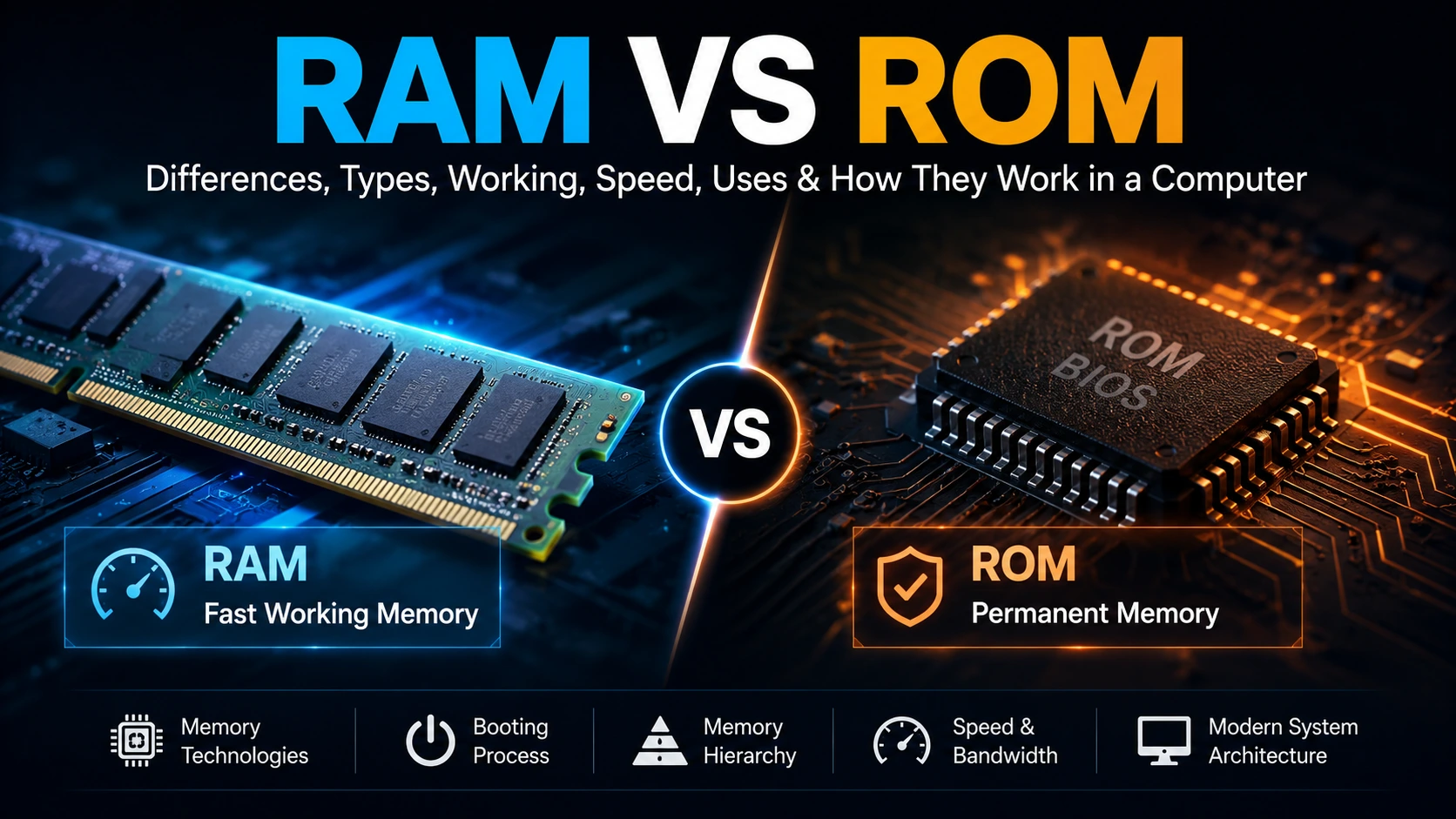
Understanding the Difference Between Working Memory and Non-Volatile Memory
Every computer needs memory to store information while it is working and to retain certain information when the power is turned off.
Two terms that are often introduced together are RAM and ROM.
They are both memory technologies, but they serve different purposes.
RAM provides the fast working space used by the processor and running programs. ROM, in its traditional sense, refers to memory designed primarily for reading fixed information. In modern systems, however, the ROM family includes programmable and rewritable non-volatile technologies such as EEPROM and Flash.
This makes a simple statement such as “RAM is temporary and ROM is permanent” useful for beginners, but incomplete for understanding modern computers.
This article moves from the basic difference to memory technologies, booting, memory hierarchy, bandwidth and modern system architecture.
What Is RAM?
RAM stands for Random Access Memory.
RAM is the computer's active working memory.
When you open a program, load a web page, edit a document or run a game, the system needs memory where the processor can work with the required instructions and data.
That working area is mainly provided by RAM.
RAM is normally volatile, meaning its contents depend on the presence of power. When a computer is shut down, the data that was being held in ordinary RAM is normally lost.
This makes RAM very different from an SSD or other permanent storage.
A useful way to think about RAM is:
RAM is where the computer keeps information it is actively working with.
What Is ROM?
ROM stands for Read-Only Memory.
The name comes from an older type of memory whose contents were intended to be read rather than regularly changed.
Traditional ROM could contain fixed instructions that remained available even when the device was powered off.
But modern systems require a more careful definition.
ROM developed into several technologies, including:
- Mask ROM
- PROM
- EPROM
- EEPROM
- Flash memory
Some of these can be programmed or erased and programmed again.
Modern computer firmware is commonly stored in Flash-based non-volatile memory. Therefore, ROM should not automatically be understood as a chip that can never be rewritten.
The traditional name remains useful because it describes the historical family of technologies from which many modern non-volatile memories developed.
RAM vs ROM: The Basic Difference
| Feature | RAM | ROM / ROM-Family Memory |
|---|---|---|
| Main purpose | Active working memory | Persistent instructions or data |
| Volatile | Normally yes | No |
| Power removed | Contents normally lost | Contents retained |
| Normal operation | Frequent reading and writing | Traditionally read-focused |
| Modern examples | DRAM, SRAM, DDR, LPDDR | EEPROM, NOR Flash, NAND Flash and traditional ROM types |
| Typical role | Running programs and active data | Firmware and persistent information |
The important point is that RAM and ROM are not competing versions of the same memory.
They solve different problems.
Why Does a Computer Need Both?
A computer needs somewhere to keep information while it is running.
It also needs some information to remain available after shutdown.
RAM handles the first requirement.
Non-volatile memory handles the second.
For example, a computer needs firmware available when it starts. Later, the operating system and applications use RAM as their working memory.
This relationship becomes much easier to understand by following the computer from the moment the power button is pressed.
From Power Button to Operating System
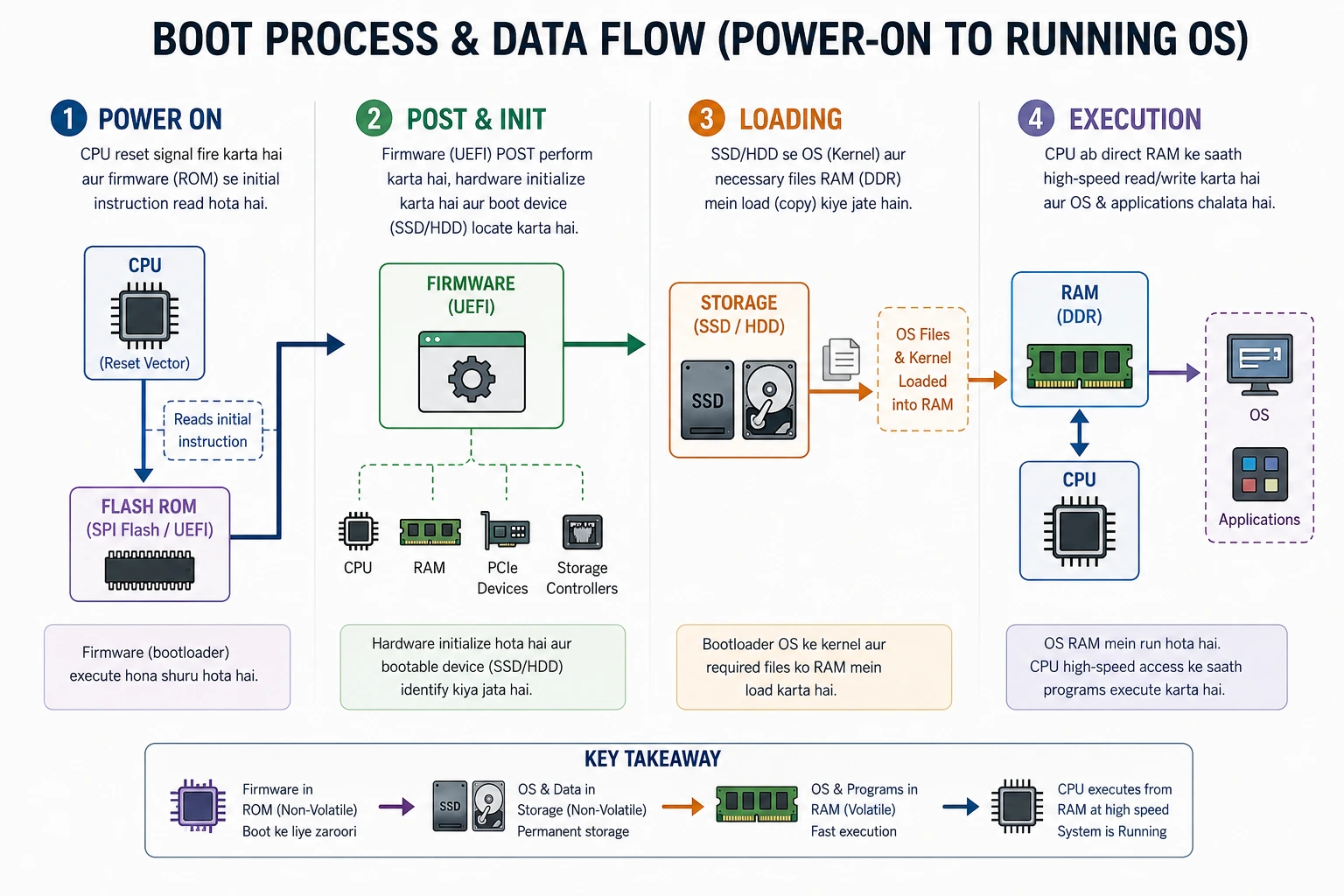
A simplified boot process looks like this:
- Power On
The system receives power and the processor begins its reset and startup sequence. - Processor Reset and Initial Execution
After reset, the processor begins from a predefined starting location or reset vector according to the platform architecture. - Firmware Is Accessed
The system's firmware, such as BIOS or UEFI on a modern PC, provides the early instructions needed to initialise hardware and continue the boot process.
The firmware is stored in non-volatile memory so that it remains available after the computer has been switched off. - Operating System Is Loaded
The firmware and boot process locate the operating system and begin loading the required parts into RAM. - Execution Begins
Once the operating system is running, applications and their active data are also placed into memory as required.
So the simplified journey is:
Power On → Reset → Firmware → Operating System → RAM → Program Execution
The important relationship is simple:
Non-volatile memory keeps essential startup information. RAM provides the working area used during execution.
What Does “Volatile” Actually Mean?
Volatile memory is memory whose stored information normally requires continuous power to remain available.
DRAM is volatile.
If power is removed, the charge used to represent stored information cannot be maintained indefinitely, so the contents are lost.
Non-volatile memory works differently.
It is designed to retain information without continuous power.
This makes non-volatile memory useful for firmware, configuration information and persistent storage.
The distinction is therefore about data retention, not simply about whether a memory can be read or written.
Can ROM Be Written?
This is where many basic explanations become misleading.
Traditional ROM was designed with fixed contents.
But different ROM-family technologies introduced different programming methods.
Mask ROM
Contents are defined during manufacturing.
PROM
PROM can be programmed after manufacturing, usually once.
EPROM
EPROM can be erased and programmed again. Historically, ultraviolet light was used for erasing.
EEPROM
EEPROM can be electrically erased and rewritten.
Flash Memory
Flash is a widely used non-volatile memory technology derived from the EEPROM family.
It is commonly used for firmware and large-scale persistent storage.
Therefore, the statement:
“RAM can be written but ROM cannot.”
is only accurate for a simplified traditional definition of ROM.
It is not a complete description of modern non-volatile memory.
How Fast Are RAM and Non-Volatile Memory?
There is no single speed number that represents all RAM or all ROM-family memory.
SRAM, DRAM, EEPROM, NOR Flash and NAND Flash have different characteristics.
A useful order-of-magnitude picture for understanding the hierarchy is:
- CPU cache: around the low-nanosecond range
- Main DRAM: often tens of nanoseconds
- SSD storage access: often tens of microseconds or more for relevant I/O operations
These are illustrative ranges, not universal specifications. Actual latency depends on the processor, cache level, memory generation, controller, access pattern and storage device.
For example, measurements around 50–60 ns for modern DRAM latency have been reported in real systems, while SSD access is orders of magnitude slower for many storage operations.
Key Takeaway
The computer does not use RAM simply because it has more capacity than cache.
It uses different memory levels because speed, capacity, cost and persistence are different engineering requirements.
Types of RAM
RAM is not one technology.
Two major categories are:
SRAM
Static Random Access Memory uses a latching circuit to hold each bit while power is available.
It does not require the same periodic refresh process used by DRAM.
SRAM is fast, but each memory cell requires more circuitry.
That makes it relatively expensive and less dense.
It is therefore commonly used for CPU cache.
DRAM
Dynamic Random Access Memory stores information using a memory cell based on a transistor and capacitor.
The stored charge gradually leaks, so DRAM requires regular refresh operations.
Its major advantage is density.
A large amount of memory can be built at a practical cost, making DRAM suitable for main system memory.
SRAM vs DRAM
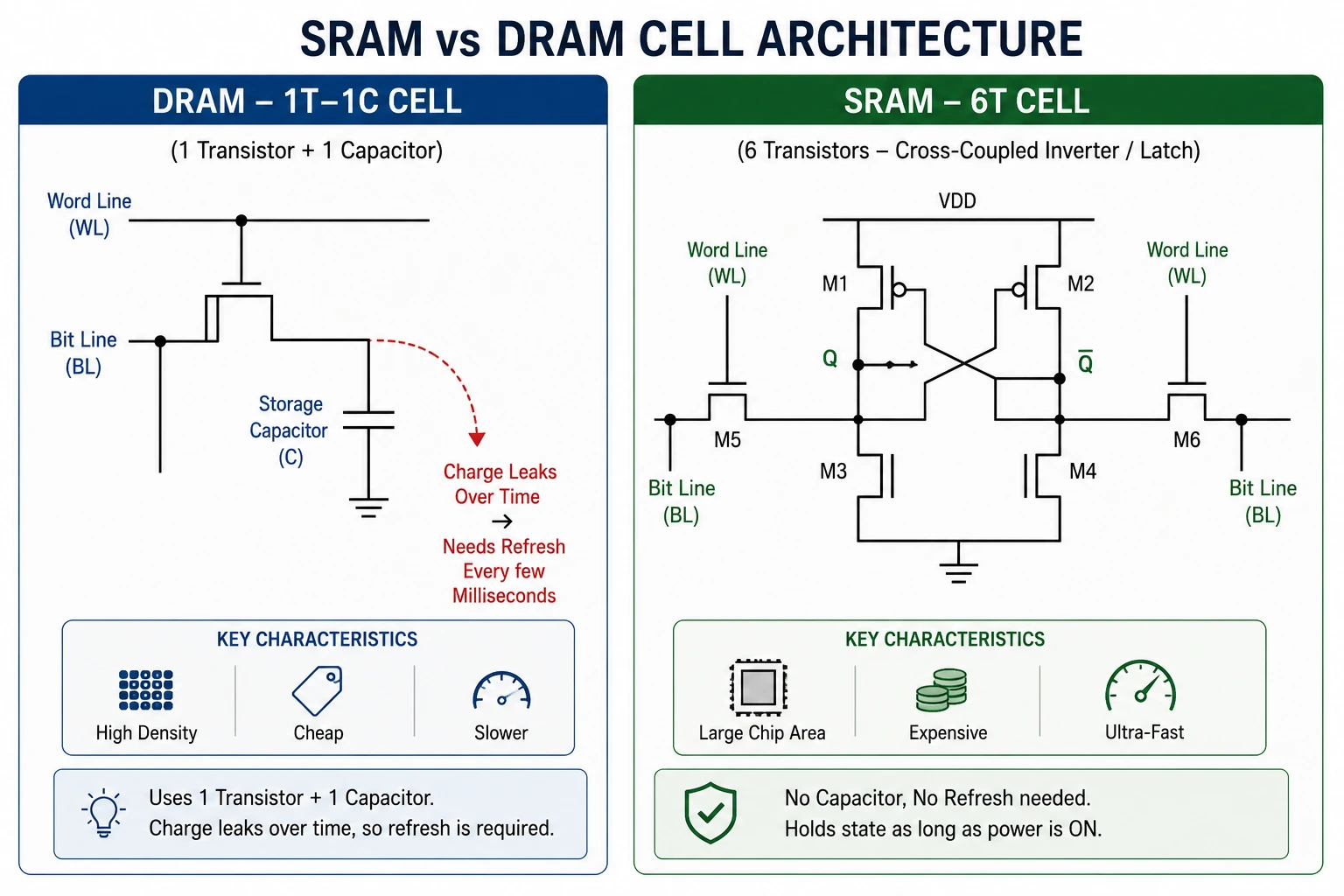
| Property | SRAM | DRAM |
|---|---|---|
| Main storage principle | Latching circuit | Transistor and capacitor |
| Refresh | Not required like DRAM | Required |
| Speed | Generally faster | Generally slower |
| Density | Lower | Higher |
| Cost per bit | Higher | Lower |
| Common role | CPU cache | Main system RAM |
This is why a computer normally does not use SRAM for all of its main memory.
SRAM provides speed.
DRAM provides practical capacity.
DDR Memory and Modern RAM
Modern desktop and laptop RAM is generally based on synchronous DRAM technology.
You may see names such as:
- DDR4
- DDR5
- LPDDR4
- LPDDR5
- LPDDR5X
DDR means Double Data Rate.
Each generation improves aspects such as transfer rate, density and power efficiency.
LPDDR is designed around the needs of lower-power systems, especially mobile devices.
However, a RAM module should not be judged by its advertised transfer rate alone.
Latency, memory timings, channel configuration, memory controller behaviour and workload also matter.
RAM Latency vs Bandwidth
Two important memory performance concepts are latency and bandwidth.
Latency
Latency describes how long it takes for a memory operation to begin returning the required data after the necessary request and addressing steps.
Lower latency generally means less waiting.
Bandwidth
Bandwidth describes how much data can be transferred over a period of time.
Higher bandwidth is particularly useful when the processor or integrated GPU needs to move large amounts of data.
These are different properties.
A memory system can have high bandwidth while still having noticeable access latency.
That is why looking only at a RAM label such as “DDR5-6000” does not tell the complete performance story.
Why Two RAM Sticks Can Perform Better Than One
Suppose a compatible desktop system supports dual-channel memory.
You could install:
- 1 × 16 GB
- or
- 2 × 8 GB
Both provide 16 GB total capacity.
But if the second configuration enables dual-channel operation, the memory controller can use two channels in parallel and increase available memory bandwidth.
A typical memory channel is 64 bits wide for standard non-ECC consumer memory. Two active channels can therefore provide an aggregate 128-bit data path.
That does not mean that every 2 × 8 GB configuration is automatically twice as fast as 1 × 16 GB.
The motherboard, CPU, memory controller, module configuration and workload all matter.
The important concept is:
Capacity and memory-channel bandwidth are different things.
Modern mainstream systems commonly support multi-channel memory, and matched pairs are used to enable dual-channel operation where the platform supports it.
Why 2 × 8 GB Can Help
Imagine one memory channel as one road.
With a single active channel, the controller has one main path through which it can transfer memory data.
With two active channels, it has two paths operating together.
The total capacity remains:
16 GB
But the available memory bandwidth can increase.
This can be especially useful for workloads that are limited by memory bandwidth, including some integrated-GPU workloads.
However, the exact performance improvement depends on the application.
So:
2 × 8 GB is not automatically “faster RAM” than 1 × 16 GB. It can provide a wider aggregate memory path when dual-channel operation is actually enabled.
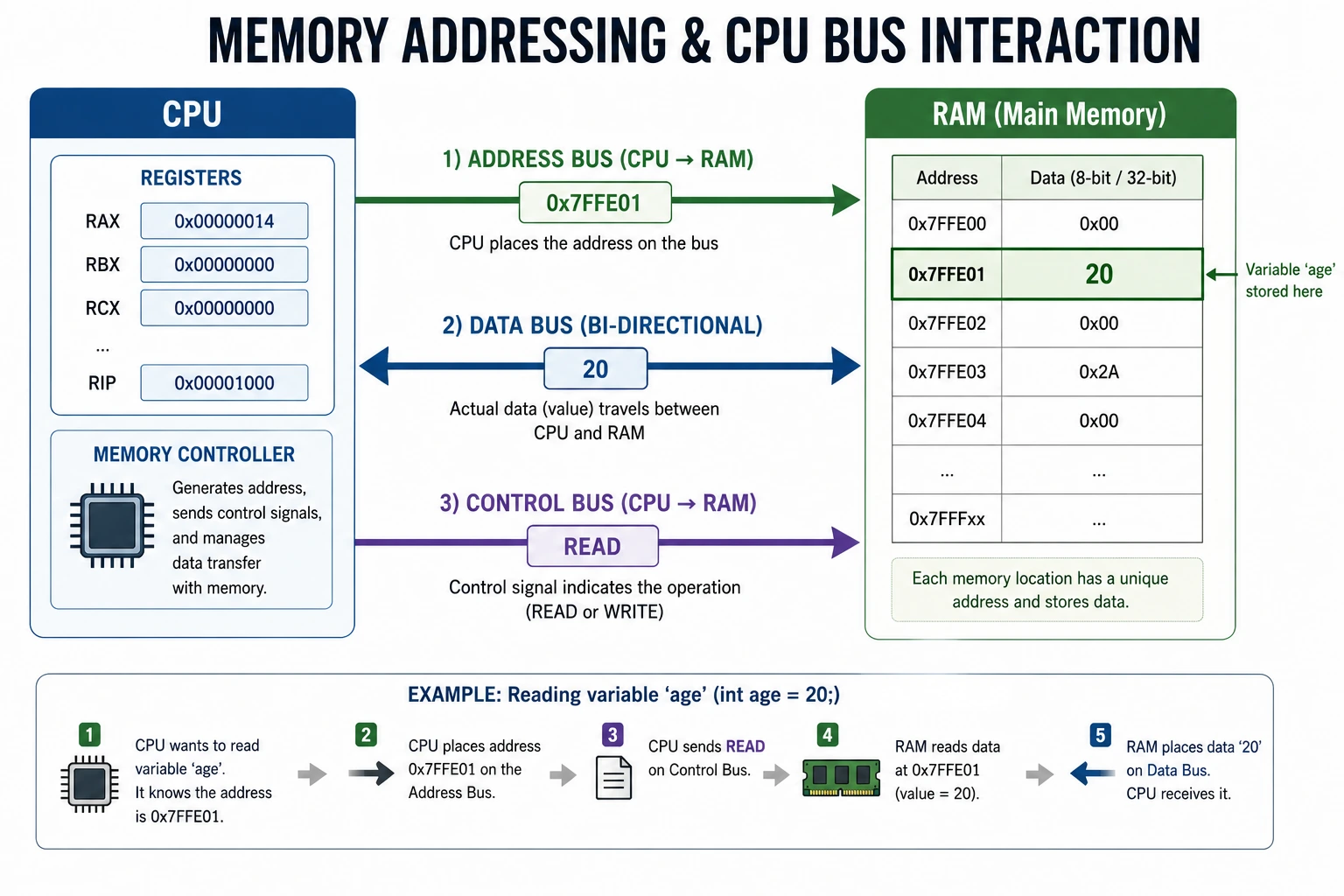
How Does the CPU Access RAM?
At a basic level, the processor needs an address to identify a memory location.
For a read operation, the system retrieves data from that location.
For a write operation, the system stores data at the selected location.
Modern processors add several layers of hardware between the CPU core and DRAM, including caches and memory controllers.
This is why the CPU does not simply communicate with every DRAM cell directly for every instruction.
RAM, Cache and Memory Hierarchy
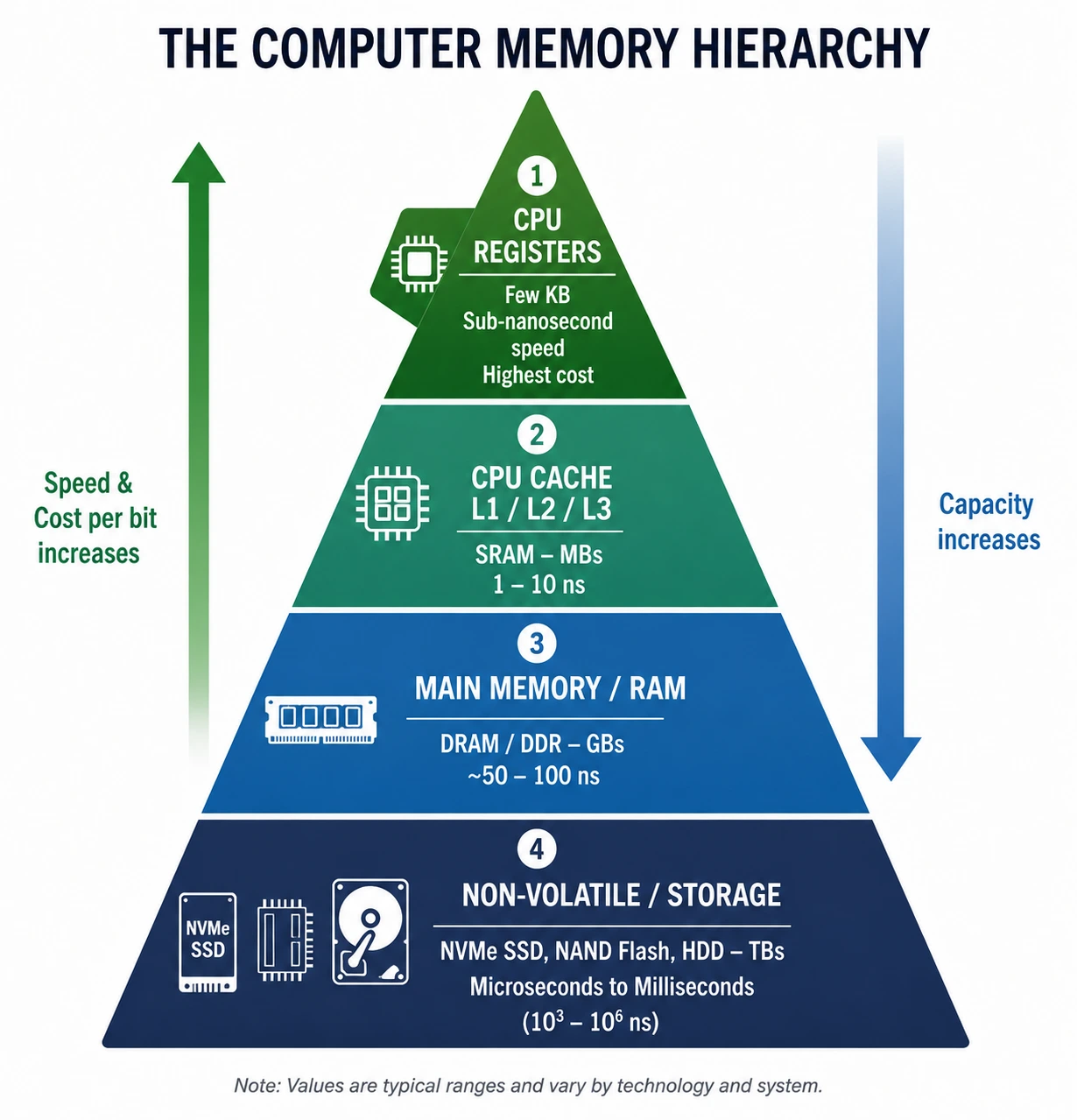
A modern computer uses several levels of memory.
A simplified hierarchy looks like this:
| Level | Typical role |
|---|---|
| CPU Registers | Immediate CPU operations |
| CPU Cache | Frequently used data and instructions |
| DRAM | Main working memory |
| Non-Volatile Memory | Firmware and persistent information |
| SSD/HDD | Large-scale persistent storage |
The closer memory is to the CPU, the faster it generally is, but capacity is usually smaller and the cost per bit is higher.
This trade-off is one of the central ideas behind computer memory architecture.
RAM and Cache Are Not the Same
Both RAM and cache hold data that the processor may need, but their roles are different.
CPU cache is generally built using SRAM.
Main system memory is generally DRAM.
Cache is much smaller but designed for extremely fast access.
DRAM provides much larger capacity at a lower cost per bit.
The processor therefore uses cache to keep frequently needed information close to the CPU while RAM provides the larger working area.
Unified Memory Architecture
Modern systems do not always separate CPU memory and GPU memory in the traditional way.
Apple Silicon is a well-known example.
In Apple's unified memory architecture, the CPU and GPU share the same physical memory pool rather than having completely separate system RAM and GPU VRAM. Apple explicitly describes Apple Silicon as using a unified memory model in which CPU and GPU share system memory.
This can reduce unnecessary copying of data between separate CPU and GPU memory pools.
For example, a graphics resource created in shared system memory can be accessed by both the CPU and GPU.
Apple's current M-series systems continue to use this approach. Apple's M6 documentation describes unified memory bandwidth up to 170 GB/s, while the M5 Ultra is specified with up to 1.2 TB/s of unified memory bandwidth.
Similar shared-memory ideas also appear in many modern integrated CPU/GPU SoCs and APUs.
Important Point
Unified memory does not mean the CPU and GPU suddenly have unlimited memory.
They share a physical memory pool, so CPU, GPU and other parts of the SoC compete for that resource.
What Is Stored in ROM or Firmware Memory?
Firmware is software that operates closely with hardware and helps a device start and control its basic functions.
In a PC, firmware such as BIOS/UEFI is stored in non-volatile memory.
During startup, the firmware can initialise hardware and begin the boot process.
It does not need to be recreated every time the computer is powered on because its contents survive the power cycle.
BIOS Shadowing: An Important Historical Detail
There is an interesting low-level technique associated with older PC BIOS implementations called BIOS shadowing.
Because older firmware ROM was relatively slow compared with system DRAM, some systems copied BIOS code from ROM into a reserved area of RAM during startup and then executed the copied code from RAM.
This allowed later firmware execution to use faster memory.
However, this should not be presented as a universal rule for modern UEFI systems.
Modern firmware implementations and processor memory mappings are much more complex, and current systems do not all use the same shadowing process.
Legacy PC architecture even included dedicated mechanisms for controlling BIOS-range read and write/shadowing behaviour. Intel documentation still exposes programmable attributes for legacy BIOS address ranges.
Key Takeaway
BIOS shadowing is an important historical example of how engineers used faster RAM to compensate for slower firmware storage, but it is not a universal description of how every modern PC executes firmware.
What Happens When RAM Is Full?
RAM has a finite capacity.
If running programs need more memory than the available physical RAM can comfortably provide, the operating system can use virtual-memory techniques.
Some data may be moved between RAM and storage.
Because SSDs are much slower than DRAM for memory-style access, heavy memory pressure can cause:
- slower application response
- increased storage activity
- longer loading or switching times
- reduced overall responsiveness
This is why increasing RAM can help a system that regularly runs out of available memory.
But if the workload already fits comfortably in RAM, adding more capacity does not automatically make the CPU faster.
RAM and ROM in Embedded Systems
The relationship between these memories becomes especially clear in embedded devices.
A microcontroller or SoC may contain:
- A processor
- RAM
- Non-volatile program memory
- Input/output interfaces
- Timers
- Other hardware peripherals
The program stored in non-volatile memory must survive power loss.
During operation, the processor uses RAM for temporary values, variables, buffers and other working information.
This basic arrangement appears in many embedded systems.
The exact implementation depends on the microcontroller or SoC.
NAND and NOR Flash
Modern Flash memory is not one uniform technology.
Two major forms are NAND Flash and NOR Flash.
NAND Flash
NAND Flash is widely used for high-density storage.
It is found in:
- SSDs
- Memory cards
- USB Flash drives
- Smartphones
- Other mass-storage devices
NAND is well suited to storing large amounts of data.
NOR Flash
NOR Flash is useful when direct access to stored code is important.
It is commonly associated with firmware and code-storage applications.
The two technologies have different internal organisation and performance characteristics, so simply calling both “Flash” does not tell the whole story.
Flash Memory Endurance
Flash memory has another important property that ordinary RAM does not have in the same way: program/erase endurance.
Flash cells can only tolerate a finite number of program/erase cycles before their reliability begins to degrade.
The exact endurance depends on the Flash technology, memory cell design and implementation.
This is one reason modern Flash storage systems use techniques such as:
- Wear levelling
- Error correction
- Bad-block management
- Garbage collection
These techniques are especially important in NAND-based storage.
The exact endurance figure should therefore never be presented as one universal number for “Flash memory.”
RAM vs ROM vs SSD
| Memory | Main role | Power off | Typical use |
|---|---|---|---|
| RAM | Active working memory | Data normally lost | Running programs |
| Firmware memory | Persistent instructions | Data retained | BIOS/UEFI, embedded firmware |
| SSD | Large persistent storage | Data retained | OS, applications and files |
This distinction is important because an SSD is not simply “a bigger ROM.”
Modern SSDs use NAND Flash with controllers, error correction and other management mechanisms designed for large-scale persistent storage.
Why More RAM Does Not Always Mean More Performance
Suppose a computer already has enough RAM for its normal workload.
Adding more capacity may not produce a large performance improvement.
But if the system frequently runs out of memory, additional RAM can make a major difference by reducing memory pressure and the need to move data between RAM and storage.
The correct question is therefore not:
“How much RAM is the most?”
It is:
“How much RAM does the workload actually need?”
Common Misconceptions
“ROM can never be rewritten.”
This is only true for certain traditional ROM types.
EEPROM and Flash can be programmed and rewritten under defined conditions.
“RAM is always faster than ROM.”
There is no single RAM speed and no single ROM speed.
Different technologies have different performance characteristics.
“All RAM is the same.”
SRAM and DRAM have very different designs and roles.
“2 × 8 GB is always twice as fast as 1 × 16 GB.”
No.
Two modules can enable dual-channel operation and increase available bandwidth, but real performance depends on the platform and workload.
“More RAM always makes a computer faster.”
No.
More RAM mainly helps when the workload needs more working memory.
“ROM and firmware mean exactly the same thing.”
No.
Firmware is software. ROM and other non-volatile memories are hardware technologies used to store information, including firmware.
“SSD is basically ROM.”
No.
An SSD is a high-capacity persistent storage device based primarily on NAND Flash and a storage controller.
Final RAM vs ROM Comparison
| Area | RAM | ROM / Modern Non-Volatile Memory |
|---|---|---|
| Fundamental role | Working memory | Persistent information |
| Data retention | Normally requires power | Designed to retain data without power |
| Typical access pattern | Frequent read/write | Read-heavy or programmed/rewrite depending on technology |
| Main technologies | SRAM, DRAM | ROM, PROM, EPROM, EEPROM, Flash |
| CPU relationship | Holds active programs and data | Holds firmware or other persistent information |
| Refresh | DRAM requires refresh | Not a DRAM-style refresh process |
| Typical capacity role | Determines active working space | Depends on firmware/storage requirement |
| Performance focus | Latency and bandwidth | Read speed, write speed, erase behaviour and endurance |
| Modern example | DDR4/DDR5/LPDDR | EEPROM, NOR Flash, NAND Flash |
| Power-off behaviour | Active contents normally disappear | Stored contents remain |
| Typical computer role | Main memory | Firmware storage |
| Typical embedded role | Working data | Program and configuration storage |
Conclusion
RAM and ROM are often introduced as a simple pair: one is temporary and the other is permanent.
That explanation is useful, but modern computer hardware is more interesting than that.
RAM is primarily the working memory used while programs and processes are running. Within RAM itself, technologies such as SRAM and DRAM are designed differently for different roles.
ROM began as a family of read-only memory technologies, but that family evolved through PROM, EPROM, EEPROM and Flash. Modern firmware is commonly stored in rewritable non-volatile memory, so the traditional definition of ROM is no longer enough to describe every modern system.
The difference becomes even clearer when we look at the complete computer architecture. CPU registers, cache, RAM, firmware memory and persistent storage work together because each provides a different balance of speed, capacity, cost and data retention.
The important lesson is therefore not simply that RAM is temporary and ROM is permanent.
It is that a computer needs different kinds of memory because different kinds of information have different requirements.
RAM provides the space where the system works with information now.
Non-volatile memory allows important information to remain available after the system is powered off.
Understanding that relationship provides a much stronger foundation for learning computer architecture, operating systems, embedded systems and hardware in greater depth.