
Artificial Intelligence has become one of the most important technologies of the modern digital world. In the last few years, AI tools have moved beyond simple question-answer systems and have started helping people in coding, research, content creation, education, productivity, and creative work.
Among these AI assistants, Google Gemini has gained significant attention because of its ability to understand and work with different types of information. Unlike traditional AI systems that mainly focus on text-based conversations, Gemini is designed as a multimodal AI assistant that can work with text, images, audio, video, and code.
However, the real value of any AI tool does not depend only on its features. The way users understand and use that technology also plays an important role. Many people try AI tools with simple instructions and expect professional-level results instantly. But the reality is different.
AI works best when users understand its capabilities, provide proper instructions, and use it according to their requirements. In this article, I will explore Google Gemini in detail, including its features, practical uses, strengths, limitations, and my personal experience of using Gemini for coding, web development, learning new skills,research, and other tasks.
What is Google Gemini ?
Google Gemini is an advanced artificial intelligence assistant developed by Google DeepMind.
It is designed to understand multiple forms of information and provide responses based on different types of inputs. Unlike traditional AI models that mainly process text, Gemini is built with multimodal capabilities.
This means it can understand and work with different data formats, including:
• Text • Images • Audio • Video • Code
This ability allows Gemini to perform a wide range of tasks, from answering questions and explaining concepts to analysing information, assisting with programming, and helping users learn new skills.
Gemini is also deeply connected with Google's ecosystem, which makes it useful for tasks related to services such as Google Workspace, documents, productivity tools, and information search.
The main idea behind Gemini is not just to provide answers but to act as an intelligent assistant that can help users think, create, learn, and solve problems more efficiently.
What is Gemini Used For ?
Google Gemini can be used for different purposes depending on the user's needs. Some of the most common applications include:
Information Research and Learning
Gemini can help users understand complex topics, summarise information, explain concepts in simple language, and organise research material. Students, researchers, and professionals can use it to quickly understand new subjects and collect important information. However, users should always verify important facts because AI-generated information may sometimes require additional checking.
Content Creation
Gemini can assist with writing tasks such as: Blog ideas | Article drafts | Social media content | Content Script etc. It can help
users organise thoughts, improve writing structure, and generate ideas. The final quality depends on how clearly users explain their requirements and provide context.
Coding and Development
One of the popular uses of Gemini is programming assistance. It can help users with: Understanding programming concepts | Generating code examples | Finding errors | Explaining code | Learning new coding languages. From my own experience, Gemini can become a useful coding assistant when users provide detailed requirements instead of only asking for a simple solution.
Productivity and Daily Tasks
Gemini can also help users improve productivity by assisting with: Planning | Summarising information | Organising ideas | Creating structured content | Managing workflows. Its usefulness increases when it is used as a personal assistant rather than only a search tool.
Key Features of Google Gemini
Multimodal Understanding
One of Gemini's biggest strengths is its ability to work with different types of information together. For example, users can provide images, text, or documents and ask Gemini to analyse or explain them. This makes Gemini more flexible compared to traditional text-only AI systems.
Google Ecosystem Integration
Since Gemini is developed by Google, it can work closely with Google's ecosystem. Integration with Google services provides advantages for users who already depend on tools like documents, storage, and productivity applications.
Large Context Understanding
Gemini is designed to handle large amounts of information. It can analyse long documents, understand detailed instructions, and maintain context during conversations. This becomes useful for tasks that require more detailed analysis instead of short answers.
Coding and Technical Assistance
Gemini can assist programmers by generating code, explaining technical concepts, and helping users understand development processes. However, generated code should always be tested and reviewed before using it in real projects.
Gemini Gems: Creating Your Own Personal AI Assistant
One of the useful features of Google Gemini is Gemini Gems. This feature allows users to create customised AI assistants according to their specific needs. Normally, when users start a new conversation with an AI assistant, they need to explain their requirements again and again. For example, a student may need an AI tutor, a developer may need coding support, and a writer may need help maintaining a specific writing style. Gemini Gems reduces this repetitive work by allowing users to create a personalised AI assistant with specific instructions. A Gem works like a customised version of Gemini that follows a particular role or purpose.
For example:
I ) Tutor Gem for Students
Students can create a Tutor Gem that explains difficult concepts in simple language, provides examples, and helps them understand topics step by step. Instead of only giving direct answers, the Gem can be configured to support the student's learning style.
II ) Coding Gem for Developers
Developers can create a Coding Gem that helps with programming-related tasks. A Coding Gem can be instructed to: Explain programming concepts | Find errors in code | Suggest improvements | Help understand new technologies. This can make the development process faster and more organised.
III ) Writing Gem for Content Creators
Writers and content creators can create a Writing Gem according to their preferred writing style. For example, a writer can configure a Gem to: | Maintain a specific tone | Follow a particular content structure | Improve grammar | Suggest better ways to present ideas. This helps maintain consistency while creating different types of content.
How Gemini Works Best ?
Many users judge AI tools based on their first interaction. They ask a simple question, receive an average response, and assume that the AI is not powerful enough. However, my experience with Gemini showed that the quality of output depends heavily on how the user communicates with the AI.
Give Clear and Detailed Instructions
AI cannot understand a user's complete intention unless the information is properly explained. A short prompt like: "Create a website." does not provide enough information. Gemini does not know:
a) What type of website is required
b) Who will use it
c) What design style is preferred
d) Which features are needed
e) Which technology should be used
Because of missing information, the AI has to make assumptions. A detailed prompt gives Gemini a clearer direction and improves the final output.
Provide Proper Context
Context plays an important role when working with AI. For example, if you ask Gemini for coding help, explaining your experience level, project requirements, and limitations can improve the response. A beginner and an experienced developer may need completely different explanations for the same topic. The more relevant information Gemini receives, the more useful its response becomes.
Use Gemini as an Assistant, Not a Replacement
One common mistake users make is expecting AI to complete everything without their involvement. AI can generate ideas, provide solutions, and speed up work, but human understanding is still important. For example, while coding, Gemini can generate code, but developers should understand, test, and modify that code according to project requirements. Similarly, while researching, AI can provide information, but important facts should be verified.
Ask Follow-up Questions
The first response from Gemini is not always the final answer. A better approach is to continue the conversation. Users can ask:
a) Explain this in a simpler way b) Improve this solution c) Add more details d) Find possible problems e) Suggest alternatives | This allows Gemini to understand the user's expectations better and provide improved results.
Combine AI Capability with Human Creativity
The best results come when AI and human thinking work together. Gemini has knowledge and processing ability, but humans provide:
a) Creativity b) Decision-making c) Real-world experience d) Personal judgement When users combine their own understanding with Gemini's assistance, the overall quality of work improves.
My Observation
After exploring Gemini for different purposes, I realised that the tool itself is only one part of the process. The way users interact with AI plays an equally important role. Gemini has the capability to assist in coding, learning, research, and creative tasks, but users need to understand how to guide it properly. A powerful AI tool with poor instructions may produce average results, while a well-structured approach can unlock much better outcomes. Understanding how Gemini works is the first step towards using it effectively.
My Practical Testing and Experience with Gemini
After understanding Gemini's features and working approach, the next important question is: How does Gemini actually perform when used for real-world tasks ? AI tools are often judged only by their features, but the real capability of an AI assistant can only be understood through practical usage. During my testing, I used Gemini for different purposes, including prompt testing, coding, web development, learning new technologies, and research. One common pattern I noticed was that Gemini's performance depends heavily on how users interact with it. A well-explained task often produces much better results compared to a simple one-line instruction.
“Gemini works best when users understand its capabilities and provide proper instructions. Better prompts generally lead to better results because the model has a clearer understanding of what you actually want.
Prompt Engineering: The Skill That Unlocks Gemini's Real Potential
If you have ever used Google Gemini and felt that the response was too basic or not exactly what you expected, the problem may not always be Gemini itself. In many cases, the actual problem is the prompt. One of the biggest misunderstandings about AI is that people expect it to understand their complete intention automatically.
However, AI does not read the user's mind. It works according to the information and instructions provided by the user. This is where prompt engineering becomes important.Prompt engineering means writing clear, structured, and detailed instructions so that AI can understand the user's requirement more accurately.
It is not a programming language or a skill limited to developers. It is simply the ability to communicate your requirement in a way that gives AI enough information to produce a better result. Think of Gemini as a skilled professional who has the knowledge and ability to complete a task. But if you only provide a vague instruction, the professional cannot understand your complete expectation. The same concept applies to AI.
Why Prompt Quality Matters in Gemini
Many users test AI tools with very short prompts and then decide whether the tool is good or bad. During my testing, I realised that this approach can create misleading results. A simple prompt usually produces a simple response because the AI has limited information. A detailed prompt provides better context, allowing Gemini to understand the purpose, requirements, and expected output.
Instead of asking: "Can Gemini do this task?" A better question is: "Have I explained this task clearly enough to Gemini?" This small difference in thinking can completely change the quality of results.
Practical Example: Creating a Website Using Different Prompts
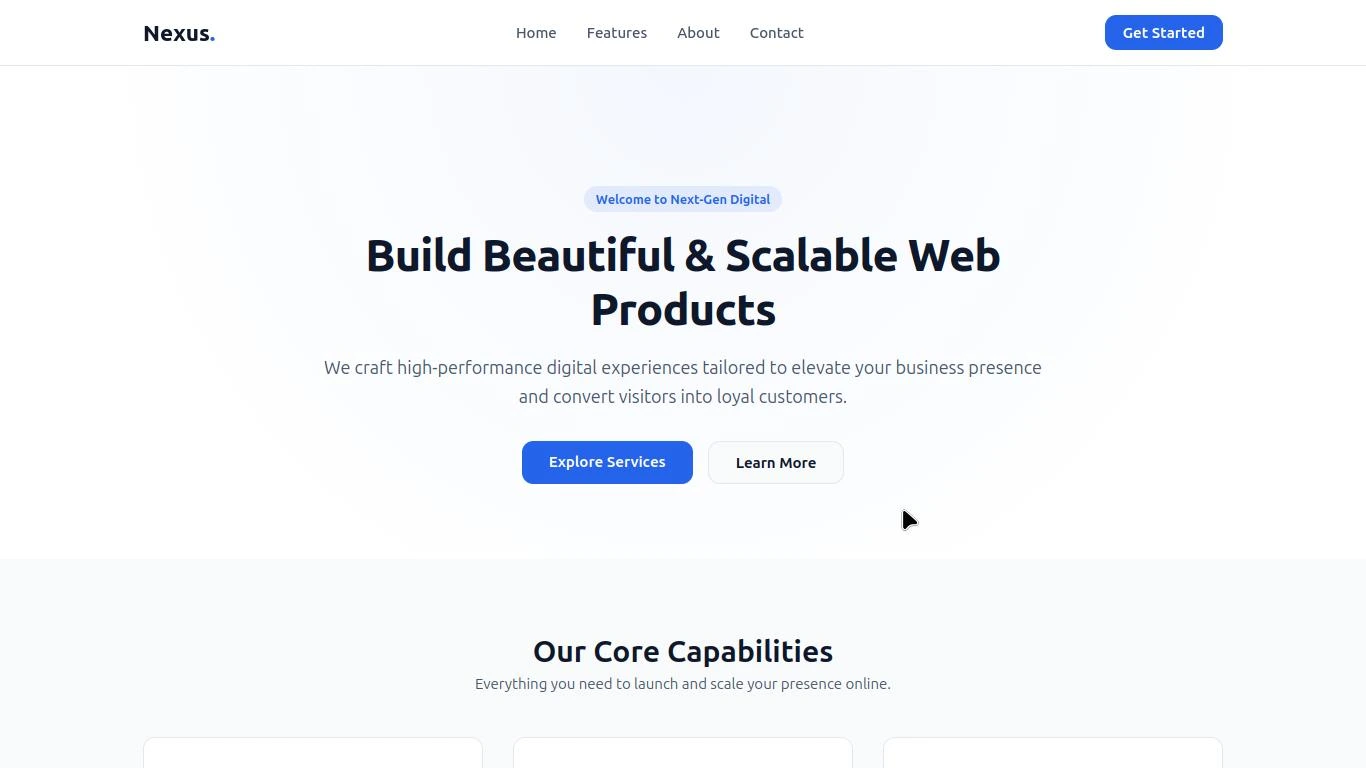
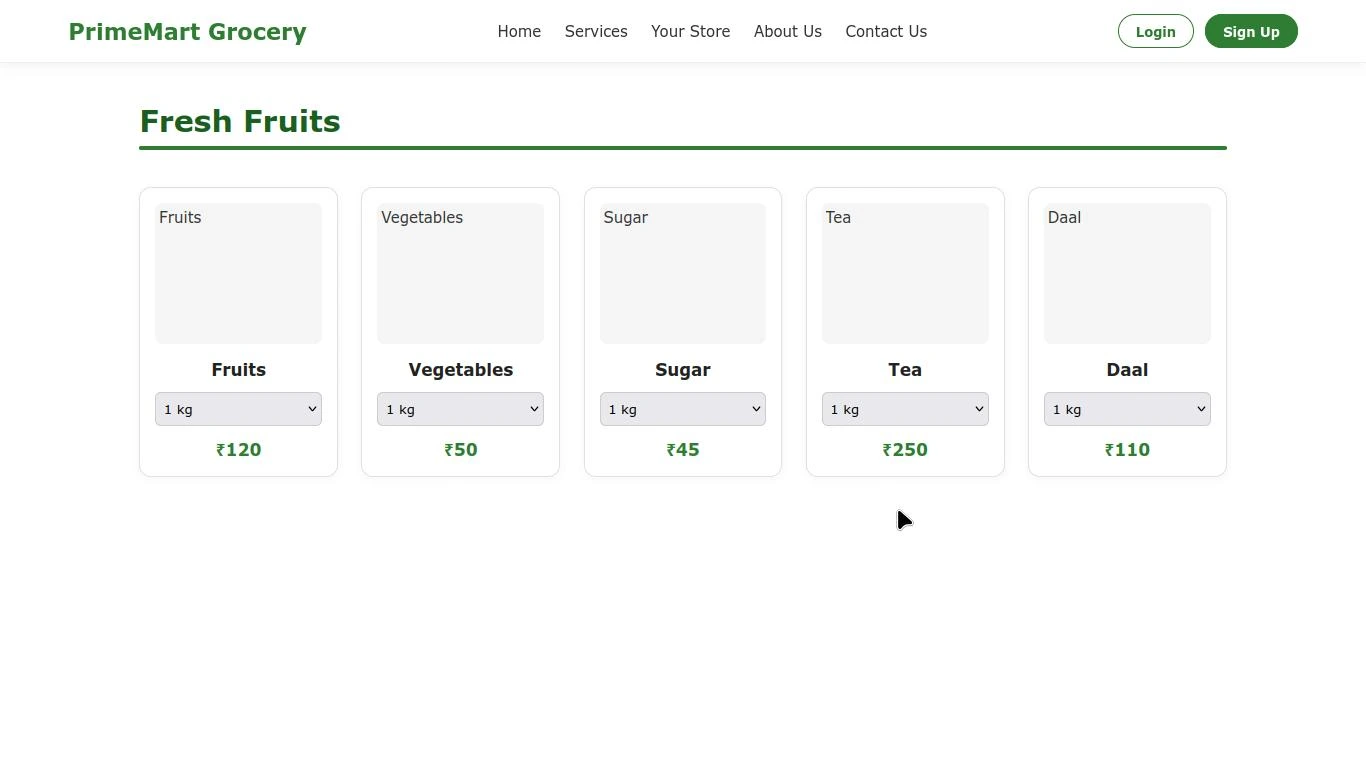
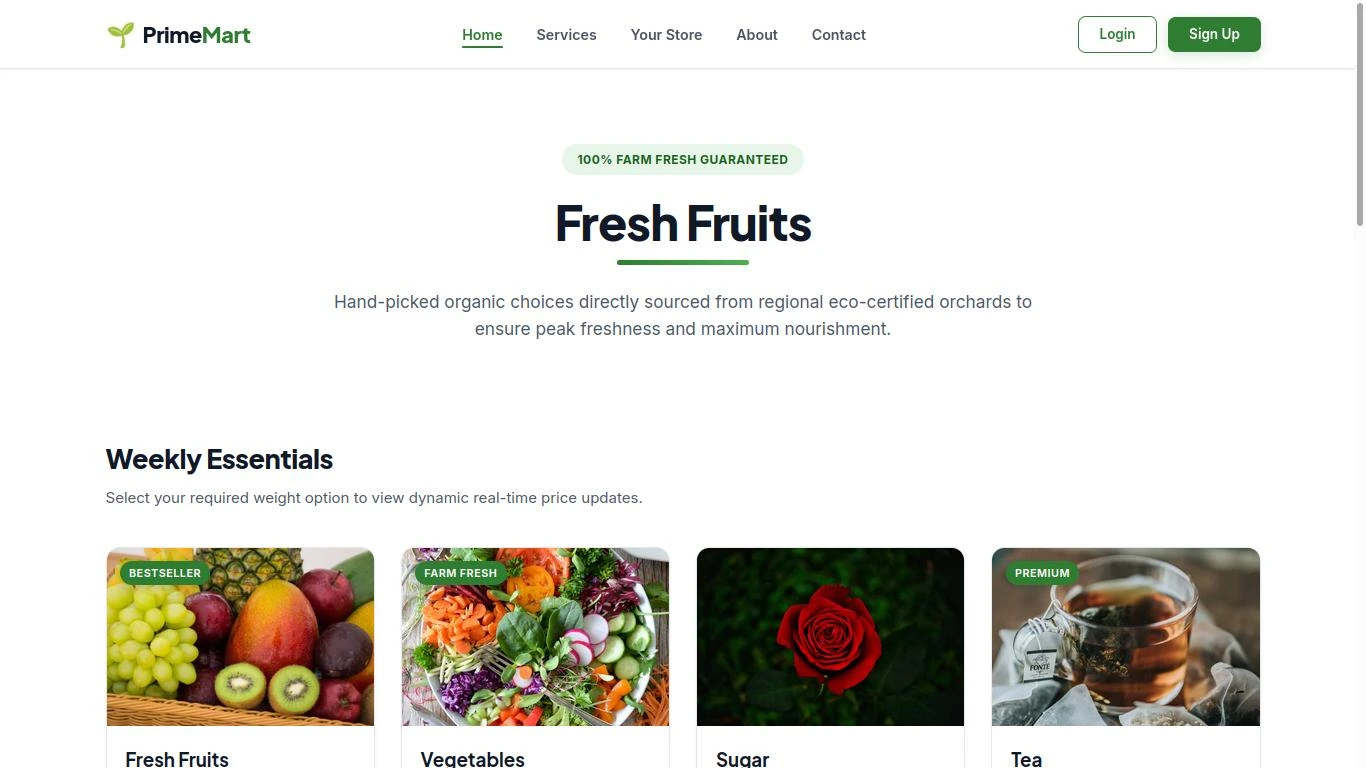
To understand the impact of prompt quality, I tested Gemini with the same task but different levels of instructions. The task was to create a website for a grocery store.
My Website Results
 Phase 01
 Phase 02
 Phase 03
The screenshots above demonstrate what happens when a very basic prompt is used. Since the prompt contains almost no design instructions, layout specifications, or functional requirements, Gemini generates a generic website structure. While the result is functional, it lacks customization, visual hierarchy, and many of the advanced features that can be achieved with a detailed, well-structured prompt.
This example highlights the importance of prompt engineering. A basic prompt produces a generic result, a partially detailed prompt delivers an improved but still incomplete output, while a well-organised prompt generates a significantly more professional, refined, and feature-rich website. The quality of an AI's response depends heavily on the clarity, structure, and completeness of the instructions provided.
Key Takeaway: The quality of AI-generated results depends not only on the model's capabilities but also on the quality, clarity, and completeness of the instructions provided by the user.
Gemini for Coding: My Practical Experience.
Coding is one of the areas where AI assistants have created a major impact. Developers and beginners are now using AI tools to understand programming concepts, generate code, solve errors, and complete projects faster. During my testing, I used Gemini for various coding-related tasks to understand how effectively it could assist in real development work. My experience showed that Gemini can be a useful coding assistant when users provide clear requirements.
It can help with: Understanding programming concepts, Generating code, Explaining existing code, Finding possible errors, Improving solutions, Learning new programming technologies, Degbugging. However, the quality of the output depends heavily on the instructions provided.
Gemini as a Coding Assistant
Many people expect AI to create a complete software project instantly by giving a single command. For example: "Create an application."This type of instruction is too broad. A real software project requires many decisions: a) Purpose of the application b) Target users c) Features d) Technology stack e) Design requirements f) Performance expectations
When these details are explained properly, Gemini can provide more relevant assistance. During my usage, I found that Gemini performs better when treated as a development partner rather than only a code generator.
Code Generation According to User Requirements
One of the strongest points I noticed while using Gemini was its ability to generate code according to user specifications. When requirements were clearly explained, Gemini was able to modify the code structure according to the given instructions.
For example, while working on projects, I could explain: a) What I wanted to build b) Which technology I wanted to use c) What features were required d) How the final output should work. Based on these details, Gemini could provide suggestions and code according to the project requirements. This makes it useful for: I) Students learning programming II) Beginners building projects III) Developers who need assistance IV) Creators working on prototypes
My Final Observation About Gemini for Coding. After using Gemini for coding tasks, one thing became clear to me:
Gemini has strong potential as a coding assistant, but it works best when combined with human understanding. It can reduce development time, explain concepts, and help users overcome programming challenges. However, developers should always review, test, and understand AI-generated code before using it in real projects. AI can assist the development process, but programming knowledge and human decision-making remain important
Gemini for Web Development: My Practical Experience
Web development is one of the areas where I spent the most time testing Google Gemini. Instead of asking random coding questions, I used it while working on actual website projects. This helped me understand not only what Gemini can do, but also how reliable it is when building a real website.
During my testing, I realised that Gemini can assist throughout different stages of web development. It can help with planning a website, writing code, improving layouts, explaining errors, and suggesting better approaches. However, its performance always depends on the quality of the instructions provided by the user.
For example, asking Gemini to "Create a website" usually produces a basic webpage. It may include a simple layout with generic colours and placeholder content because the AI has very little information to work with.
On the other hand, when I explained the complete project, including the website's purpose, target audience, preferred design, sections, colour theme, responsiveness, and technical requirements, the quality of the generated code improved significantly.
This showed me that Gemini does not simply generate random code. It tries to follow the direction provided by the user. The clearer the requirements, the more accurate the output becomes.
Another thing I noticed was that web development is rarely completed in a single conversation. Building a good website is an iterative process. I often asked Gemini to improve layouts, organise the code, optimise sections, or modify existing designs. Instead of generating everything again, Gemini could continue improving the project based on my feedback. This approach made development much faster because I did not have to rewrite every section manually.
From my experience, Gemini is particularly useful for: I) Creating HTML, CSS, and JavaScript code II) Designing responsive layouts III) Explaining how different parts of the code work IV) Improving the structure of existing projects V) Suggesting better UI and UX ideas VI) Solving common coding problems.
Another thing I noticed was that web development is rarely completed in a single conversation. Building a good website is an iterative process. I often asked Gemini to improve layouts, organise the code, optimise sections, or modify existing designs. Instead of generating everything again, Gemini could continue improving the project based on my feedback.
A more practical example from my experience was a freelancing website called UnityNova. Before building the website, I personally visited City Centre Mall in Patna to understand the requirements and challenges faced by potential users. I interacted with people looking for job opportunities and additional sources of income, including students and individuals interested in earning through freelance work. Based on these observations, I planned and developed the website with the help of Gemini for coding and implementation. This approach made development much faster because I did not have to rewrite every section manually.
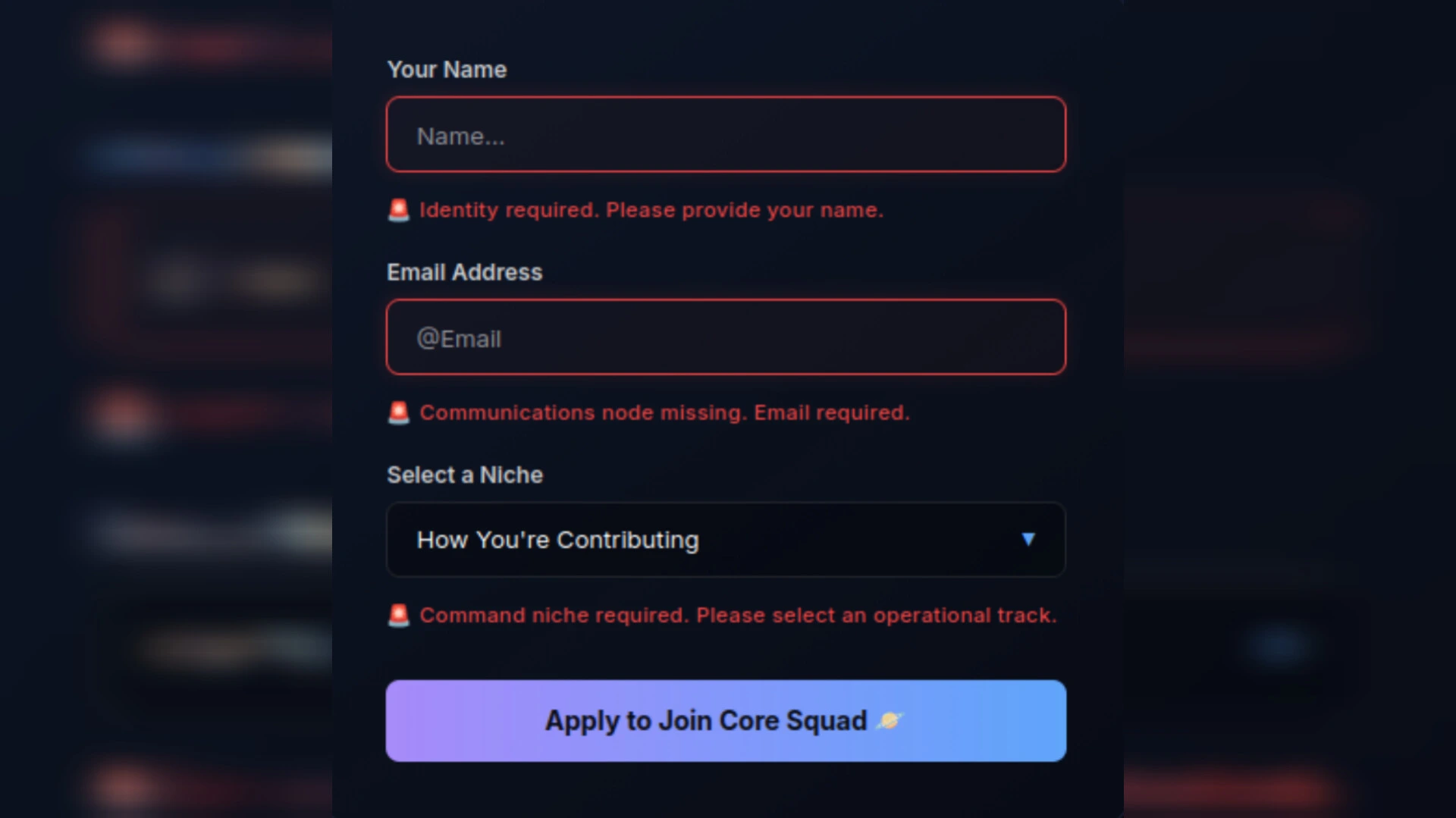
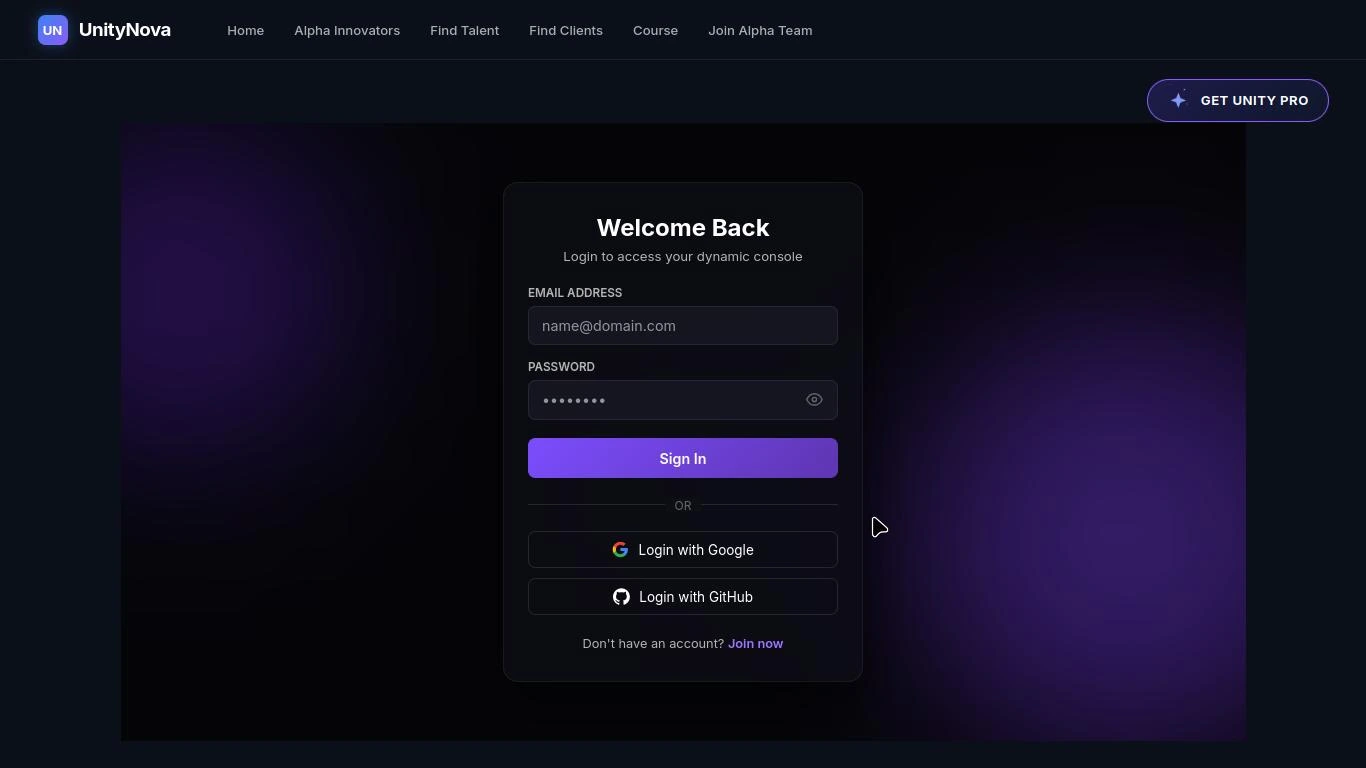
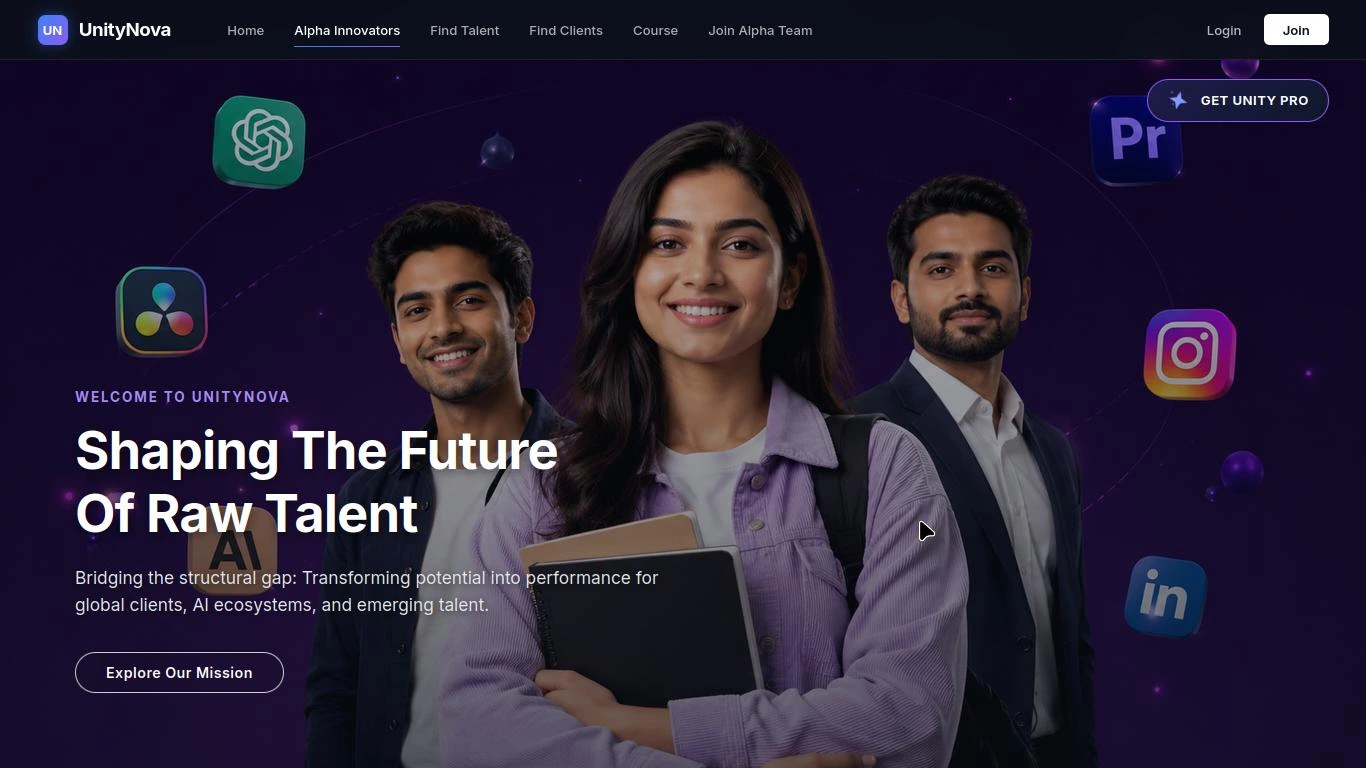
However, it is important to understand that AI-generated code should not be copied blindly into a production project. Every generated solution should be reviewed, tested, and modified according to the project's requirements.
Overall, my practical testing showed that Gemini can become a valuable web development assistant, especially for beginners, students, freelancers, and developers who want to speed up repetitive tasks while still maintaining control over the final project.
Gemini for Learning New Skills: My Godot Engine Experience
One of the most interesting ways I used Gemini was for learning an entirely new technology. At that time, I wanted to create a 3D animation project. I already knew about software such as Unreal Engine and Blender, but I had never used Godot Engine before. More importantly, my laptop was a basic machine without a powerful graphics card or high-end hardware, so I needed a lightweight solution.
Instead of simply recommending the most popular software, Gemini considered my requirements and my laptop's capabilities. Based on that information, it suggested that I use Godot Engine because it was better suited to my hardware. This recommendation was practical rather than generic, and it saved me from installing software that my laptop might have struggled to run.
After choosing Godot, Gemini continued helping me throughout the learning process. It explained: I) Which version of Godot was suitable for my system II) How to install it correctly III) How to create my first project IV) The purpose of different buttons and tools V) How scenes and objects work VI) The basic workflow for creating animations
As a beginner, I often encountered small doubts that were difficult to solve through long tutorial videos. Instead of searching across multiple websites, I could ask Gemini directly and receive explanations related to my specific problem.
Step by step, I became familiar with the interface and understood how different tools worked together. Eventually, I was able to create my own 3D animation successfully.
For me, this experience demonstrated that Gemini is not only useful for completing tasks but also for learning new skills. It does not replace practice, curiosity, or experimentation. Instead, it acts as a guide that helps users move forward whenever they get stuck.
One important lesson I learned from this experience is that AI becomes much more valuable when users ask questions to understand a concept rather than simply requesting the final answer. This approach helped me learn the software instead of simply copying instructions.
Guided Learning
Gemini's Guided Learning experience is designed around a more interactive learning process rather than simply presenting an answer.
This video is an example of what I was able to create while learning Godot Engine with the help of Gemini. I used Godot to work on a 3D animation project and gradually became familiar with its interface, scenes, objects, and animation workflow. Since I had never worked with Godot before, I used Gemini to understand different tools and resolve the questions I encountered during the process.
What made this experience particularly useful was that I was not simply following a predefined tutorial. I could ask Gemini about specific problems as they appeared during development and receive explanations based on the situation I was working on. This made the learning process more interactive and allowed me to experiment with the engine while understanding what I was doing.
The final animation became a practical demonstration of my learning process rather than just a generated result. Gemini helped me understand the technology and overcome obstacles, but creating the project still required experimentation, implementation, and my own decisions.
My experience with Godot showed me that Gemini can be a useful guide for learning a completely new skill. It helped me understand Godot from the basics and supported me while working on my 3D animation project. I also used this knowledge to experiment with a Temple Run-style game, where I could apply what I had learned and troubleshoot problems during development. This experience showed me that Gemini can support both learning and practical experimentation, while the actual progress still depends on the user's practice and involvement.
Want to see more of my projects and experiments? You can follow my Instagram project page, where I share the new projects I work on, the technologies I explore, and the things I learn through real-world research and experimentation. Follow along and stay connected with my journey as I continue building, learning, and exploring new ideas.
Gemini for Research: A Powerful Assistant That Still Requires Verification
Research is another area where I spent considerable time testing Gemini. Whether I was exploring AI, programming, cybersecurity, or technology-related topics, Gemini was able to organise information quickly and explain complex ideas in a simple way. One of its biggest strengths is that it can save time by summarising large amounts of information into well structured points.
Instead of reading multiple articles from beginning to end, users can quickly understand the main concepts before exploring them in greater detail.
During my research sessions, Gemini also helped me: a) Break complex topics into smaller sections b) Understand technical concepts c) Organise information logically d) Generate ideas for further research e) Identify important discussion points.
This made the research process faster and more organised. However, my testing also revealed an important limitation. Sometimes Gemini presented information that was no longer up to date. This does not necessarily mean the information was incorrect, but it could be based on older data while newer developments had already taken place.
For technology-related topics, where updates happen frequently, this can become important. I found that mentioning the need for the latest available information often improved the relevance of the response. Even then, I believe important facts, statistics, product specifications, and recent announcements should always be verified using official sources before publishing them.
From my experience, Gemini should not be treated as the final authority during research. Instead, it works best as a research assistant that helps users understand topics faster, organise information more effectively, and discover new directions for further investigation. When combined with human verification and critical thinking, it becomes a highly valuable tool for researchers, writers, students, and professionals.
AI-generated information should not automatically be treated as authoritative. For important factual, technical or current information, verify it against reliable primary sources.
My Overall Observation After Practical Testing
After testing Gemini across prompt engineering, coding, web development, learning, and research, one conclusion became very clear. Gemini is not a tool that automatically produces outstanding results on its own. Its real strength appears when users understand how to communicate with it, provide clear instructions, and actively participate in the process.
The quality of the outcome depends not only on Gemini's capabilities but also on the user's ability to explain the task, verify the information, and refine the final result. In my experience, Gemini works best as a collaborative assistant rather than a complete replacement for human knowledge and decision-making.
Testing Gemini's Creative and Educational Capabilities
After testing Gemini for coding, web development, learning, and research, I wanted to explore some of its other capabilities. In this section, I tested Gemini for image generation, AI video generation, and educational support to understand how well it performs in real-world situations.
Rather than relying only on feature lists or official descriptions, I focused on practical testing and observed how Gemini responded to different types of requests.
Gemini for Image and Poster Generation: Does Prompt Quality Really Matter ?
Image generation is one of the most popular AI features today. Many users expect an AI assistant to create high-quality images instantly, but my testing showed that the quality of the final image depends heavily on the quality of the prompt.
When I provided a simple prompt with very little information, Gemini generated a basic image that followed the general idea but lacked important details.
For this experiment, I decided to use the grocery store example again, this time to test how different levels of prompting affect Gemini's "image generation" results. Instead of using only one prompt, I asked Gemini to generate the images using two different levels of prompting:
I) Basic Prompt I started with a very simple instruction: "Generate a grocery store Image"
This prompt provided Gemini with only the main subject and did not specify details such as the environment, lighting, camera angle, colours, composition, or visual style. As a result, Gemini had to make most of the creative decisions on its own. This gave me a basic starting point that I could later compare with the results produced using more detailed prompts.

II) Advanced Prompt
I then provided Gemini with a more detailed prompt. Instead of only naming the subject, I started describing the scene and some of the visual requirements. This gave Gemini more information about what I wanted the final image to look like and reduced the number of decisions the AI had to make on its own.
"A realistic cinematic shot of an elderly shopkeeper sitting inside a traditional
grocery store. He is carefully weighing sugar on a digital weighing scale placed
on the counter. In front of the shop counter, there are stacked packages of fresh
bread and transparent plastic jars with 'Center Fresh' branding, filled with an
assortment of colorful random chocolates and candies. A customer is standing near
the counter, waiting to be served. Warm ambient lighting, highly detailed textures,
vibrant colors, photorealistic depth of field, 8k resolution."
What I Observed
After generating two images with Gemini using different levels of prompting, one thing became clear to me: prompt quality can significantly influence how closely an AI-generated image matches the user's intended result.
The basic prompt gave Gemini a general idea, but many visual decisions were left to the AI. As more relevant details were added in the advanced prompt, the generated images had clearer direction and greater control over the intended scene.
This experiment also showed me that writing an effective image-generation prompt is not simply about making the prompt longer. The important part is providing relevant visual information that helps the AI understand what the user actually wants.
Another observation from my testing was that Gemini sometimes refuses image editing requests and displays a message similar to: "Sorry, I can't edit images for you yet. Can I generate an image instead, or help with something else ?" This does not necessarily mean Gemini cannot work with images. It simply shows that certain editing requests may not be supported in every situation. However, when I switched from image editing to image generation using clear prompts, Gemini was able to create the requested images successfully.
From my experience, the biggest lesson is simple: Gemini's image generation capability is closely connected to prompt quality.
Gemini for Video Generation: From My Early Testing to the Latest Update
Introduction
AI video generation has developed rapidly, and Gemini's video-generation capabilities have also changed significantly over time. My own experience with Gemini reflects this change quite clearly. When I initially tested Gemini for video generation, the experience was very different from what I experienced later after the feature was updated.
My Earlier Experience With Gemini Video Generation
During my earlier testing, I wanted to see whether Gemini could generate a realistic cinematic video from a detailed text prompt. I gave Gemini a carefully structured prompt describing a six-second cinematic scene featuring an elderly Indian grocery shopkeeper inside a traditional grocery store. The prompt included details such as:
a) An elderly Indian grocery shopkeeper, b) A traditional grocery store, c) Scooping sugar into a paper bag, d) Warm ambient lighting, e) Realistic character movement, f) Camera direction, Background details and Cinematic composition.
The prompt was detailed enough to describe the complete scene, including the environment, subject, movement and visual style. However, instead of generating the video, Gemini returned the following message: "I couldn't do that because I'm getting a lot of requests right now. Please try again later."
I repeated the test several times and also tried different prompts, but I continued receiving the same response. At that stage, I could not successfully generate a video through Gemini. This was my actual experience at the time, but it was not enough to conclude that Gemini was incapable of video generation. AI features can change quickly, and availability can depend on factors such as the model being used, account access, subscription level, region, feature rollout and server availability.
Gemini's Video Generation Has Now Changed
After the later updates to Gemini's video-generation capabilities, I tested the feature again. This time, the result was completely different.
I gave Gemini a much more complex request: create a premium 10-second cinematic television advertisement for a fictional AAA game-development company called "ZER0X GAMES."
The prompt was designed like a real commercial production brief rather than a simple text-to-video instruction. It specified the format, visual quality, branding, camera movement, scene transitions, environments, audio and complete timeline.
The video was divided into multiple sections, including: a) A futuristic ZER0X GAMES brand opening, b) A cinematic 3D shooting-game sequence, c) A high-speed futuristic car-racing sequence d) An action-adventure game environment e) A rapid gaming montage f) A final brand reveal with the tagline "PLAY BEYOND LIMITS"
I also specified details such as 16:9 widescreen, photorealistic 3D graphics, AAA console/PC game quality, cinematic lighting, realistic physics, motion blur, depth of field, explosions, vehicle movement, sound effects and cinematic transitions.
This time, Gemini successfully generated the video. You can watch the ZER0X GAMES advertisement generated during my latest testing below.
The result was significantly better than my earlier experience and demonstrated that Gemini's video-generation capability had become much more practical for creative video production.
What Changed From My Earlier Test ?
The difference between my two experiences is important.
My first test happened when Gemini was unable to complete the video-generation request and repeatedly returned a temporary availability message. My later test, after Gemini's newer video-generation capabilities became available, successfully produced a complete cinematic advertisement from a detailed prompt.This shows why AI tools should not always be judged permanently from a single test performed at one point in time. AI models and their features are continuously updated, and the experience can change considerably within a relatively short period.
According to the information available to me during my research, Google's video-generation capabilities in the Gemini ecosystem have developed through multiple stages, including the integration of Google's Veo video-generation models and later improvements to the Gemini experience. Google also introduced newer capabilities around 2026 that made video creation and editing more directly accessible through the Gemini experience.
The important point for users is that Gemini is no longer something I would describe simply as unreliable for video generation based on my earlier test. My latest practical test produced a successful result.
My Current Practical Experience
Based on my latest testing, Gemini can now be useful for generating short cinematic videos, advertisements, creative concepts, game-related scenes and other prompt-driven video content. However, the quality of the final output still depends heavily on how the prompt is written. For example, my ZER0X GAMES prompt did not simply say: "Make a video game advertisement."
Instead, I provided a complete creative direction covering the duration, scenes, camera movement, visual style, transitions, environment, characters, audio and final branding. This level of organisation gave Gemini enough information to understand the intended production rather than leaving important creative decisions completely undefined.
My Updated View of Gemini for Video Generation
My opinion has therefore changed after testing the newer capability. Earlier: I could not successfully generate a video with Gemini despite repeated attempts. Later: I successfully generated a complete 10-second cinematic advertisement using a detailed production-style prompt.
This does not mean that every Gemini video-generation request will produce a perfect result. AI video generation can still vary depending on the prompt, model availability, access, generation limits and the complexity of the requested scene.
But based on my latest practical experience, Gemini's video-generation capabilities have improved considerably compared with what I experienced during my earlier testing. I will therefore treat my earlier failed test as a record of my experience at that time rather than as a permanent limitation of Gemini.
Research Accuracy Note: The exact availability and rollout of Gemini video-generation capabilities can vary by model, account, plan, region and feature rollout. For that reason, this section presents my personal testing as a time-specific experience rather than treating one result as a permanent limitation or guarantee for every Gemini user.
Gemini for Students: More Than Just an Answer Generator
Students are among the people who can benefit the most from AI assistants, but only if they use them correctly. Many students think AI is simply a shortcut for getting instant answers. In reality, Gemini can become much more useful when it is treated as a learning partner instead of an answer-generating tool.
During my testing, I found that Gemini can help students in several practical ways. It can explain difficult concepts in simple language, break large topics into smaller sections, summarise lengthy chapters, generate practice questions, and provide examples that make learning easier to understand.
One feature that makes Gemini particularly useful for students is Gemini Gems. Students can create a customised Tutor Gem that matches their preferred learning style. Instead of explaining their requirements in every new conversation, they can configure the Gem once and continue learning with consistent instructions. For example, a student can ask the Tutor Gem to: a) Explain concepts using simple English, b) Teach step by step instead of giving direct answers, c) Include practical examples wherever possible
Guided Learning: Helping Students Think Instead of Memorise
One of the educational features that impressed me the most while using Gemini is Guided Learning.
Unlike a traditional chatbot that simply provides the final answer, Guided Learning focuses on helping users understand how to reach the answer. Instead of solving every problem immediately, Gemini encourages students to think through the process step by step.
This approach is particularly useful because learning is not just about remembering facts. It is about developing the ability to analyse problems, identify patterns, and apply concepts to new situations. For example, if a student asks a difficult question, Gemini may avoid giving the complete solution straight away. Instead, it can ask guiding questions, provide hints, explain the underlying concept, and gradually lead the student towards the correct answer.
This learning method offers several advantages: a) It improves logical thinking, b) It strengthens problem-solving skills, c) It helps students understand concepts instead of memorising answers, d) It builds confidence when solving similar questions independently.
During my testing, I found this approach more educational than simply receiving direct answers. When students understand the process behind a solution, they are more likely to solve similar problems in the future without relying on AI.
In my opinion, Guided Learning is one of Gemini's most valuable features for education because it encourages independent thinking rather than passive learning.
Strengths and Limitations of Google Gemini
After testing Gemini across multiple real-world tasks, I identified several areas where it performs particularly well. But Remember no AI assistant is perfect, and my testing showed that Gemini also has certain limitations that users should understand before depending on it.
Strengths
From my practical testing, I found that Gemini performs particularly well in areas such as prompting, coding, web development, learning new skills, research, personalised assistance, and Google's ecosystem. Its results become much better when users explain what they actually need instead of simply asking for an instant answer.
In my experience, Gemini helped me write and improve code, understand technical problems, learn Godot Engine, organise research, create personalised assistants with Gems, and handle different everyday tasks. This makes it useful for students, developers, creators, researchers, and anyone who wants to learn or explore something new.
However, I would not simply call Gemini “the best AI” . From what I experienced, its biggest strength is that it can work as a hlblack">versatile assistant for different kinds of tasks. The final result still depends on how clearly we explain the task, how we use the response, and whether we verify and improve the result ourselves.
Limitations
No AI assistant is perfect, and my practical testing also showed that Gemini has some limitations. Its responses may sometimes need clarification, important information may require verification, and the quality of the output can vary depending on how clearly the user explains the task. My Overall Assessment After using Gemini for coding, web development, learning, research, image generation, and other tasks, I found that its biggest strength is not simply answering questions but working alongside the user. The more clearly you explain your objective, ask follow-up questions, and verify important information, the more useful Gemini becomes.
Strengths
- Better with clear prompts
- Strong assistance for coding and writing
- Versatile assistant
- Works well interactively
- Help in Learning new skills
Limitations
- Can produce incorrect information
- Not always accurate
- Important information still needs verification
- Not always the best choice
- One-shot answers are not always enough
Getting the Best Results from Google Gemini
After testing Gemini across different use cases, I realised that the tool itself is only one part of the equation. The other part is the user. Two people can use the same AI model for the same task and still get completely different results. The difference often comes down to how they communicate with the AI and how they use the information it provides. Based on my practical experience, here are the best practices and common mistakes that every Gemini user should know.
Best Practices for Using Google Gemini
-
Clearly Explain Your Objective
Before writing a prompt, first think about what you actually want Gemini to do. Clearly explain your objective, requirements, expected result, and any important details related to the task. The more clearly you explain what you want, the easier it becomes for Gemini to understand your intention and provide a useful response. The goal is not to make every prompt extremely long, but to give Gemini the right information in a clear and organised way.
Provide Context Instead of One-Line Instructions Context helps Gemini understand the complete situation instead of making assumptions from a short instruction. When working on a coding project, for example, explain the project goal, your requirements, existing code, problems you are facing, and the expected result. Providing relevant context gives Gemini a clearer picture of what you are trying to achieve and usually leads to more useful responses. It also makes it easier to continue improving the same work through follow-up prompts. Iterative improvements usually produce better results than expecting perfection from a single prompt.
-
Always Review the Final Output
Even when Gemini provides a good response, don't use or publish it immediately. Read the output carefully, verify important information, correct mistakes, and add your own knowledge and experience. This helps ensure that the final result is accurate, useful, and reflects your own understanding.
-
Use Gemini as a Learning Partner
Instead of asking Gemini only for direct answers, use it to understand concepts, compare different approaches, and learn step by step. This helps solve the immediate problem while also building knowledge that can be useful in the future.
- Iterate. Improve the prompt when the first answer is not useful.
- Verify. Check important information independently.
Common Mistakes While Using Google Gemini
Although Gemini is a powerful AI assistant, users can still get poor results if they make some common mistakes. During my testing, I noticed a few patterns that can easily reduce the quality of the output.
Giving Extremely Short Prompts One of the most common mistakes is expecting detailed and accurate results from a very short instruction. When a prompt contains very little information, Gemini has to make assumptions about what the user actually wants. This can result in generic, incomplete, or less relevant responses.
Expecting AI to Read Your Mind AI only knows what you tell it. If important details are missing from the prompt, Gemini has no way of understanding your hidden expectations or exactly what you want. This can lead to results that may be technically correct but different from what you actually expected. Always provide enough relevant information and context before expecting a highly customised result.
Blindly Trusting Every ResponseAI-generated information should never be accepted without verification. Gemini can provide useful information, but important details may still require additional checking. For research, statistics, legal information, medical topics, financial advice, or rapidly changing technology, always confirm important information using reliable and official sources before depending on or publishing it.
Copying AI Output Without Understanding It This is especially common in coding. Many beginners copy AI-generated code directly into their projects without understanding how it works or why a particular solution was used. A better approach is to ask Gemini to explain the code, understand the logic, and then modify it according to your own requirements. This helps users improve their programming knowledge instead of becoming dependent on generated solutions. Learning from AI is much more valuable than simply copying from it.
Expecting Perfection in the First Response AI-generated content often improves through conversation. Instead of assuming that the first response is the final version, continue the conversation by asking follow-up questions, requesting improvements, and explaining what needs to be changed. This iterative approach usually helps Gemini understand your expectations better and can produce more accurate, relevant, and higher-quality results.
Ignoring Personal Experience One mistake I often notice is relying entirely on AI-generated content. Your own experience, observations, and practical testing add a level of originality that AI cannot replicate. Combining your knowledge with Gemini's assistance can make the final content more authentic, trustworthy, and valuable for readers.
Who Should Use Google Gemini?
After spending considerable time testing Gemini across different tasks, I believe it can be useful for a wide range of users. However, the people who benefit the most are those who actively interact with the AI instead of treating it as a simple answer generator.
Students They can use Gemini to understand concepts, revise topics, prepare notes, explore new subjects, and improve their problem-solving skills. Features such as Guided Learning and Gemini Gems can also make the learning experience more personalised.
Developers and Programmers Developers can use Gemini for code generation, debugging, learning new programming languages, understanding frameworks, and speeding up software development. It can be useful for both beginners who are learning programming and experienced developers who need assistance with development tasks. However, AI-generated code should always be reviewed, tested, and modified according to the project's requirements before being used in a real or production project.
Content Creators and Writers Bloggers, writers, and content creators can use Gemini to organise ideas, create outlines, improve writing, generate drafts, and overcome writer's block. However, adding their own expertise, experience, and personal perspective is important for making the final content more original and authentic.
Researchers and Professionals Researchers and working professionals can use Gemini to summarise information, analyse documents, organise ideas, and improve productivity. It can help make complex information easier to understand and organise, especially when working with large amounts of material. However, verification remains essential whenever accuracy is critical, particularly when dealing with important facts, statistics, or professional information.
Lifelong Learners Anyone interested in learning a new technology, software tool, programming language, or creative skill can use Gemini as a personalised learning companion. It can guide users through unfamiliar concepts, answer questions along the way, and help them overcome problems as they learn. My own experience learning Godot Engine showed me how effective this approach can be when curiosity, practice, and AI guidance work together.
My Recommendation Based on my practical testing, I would recommend Gemini to people who are willing to learn, experiment, and actively participate in the process. Users who simply expect instant answers may experience only a small part of what Gemini can offer. Those who ask better questions, provide clear instructions, verify important information, and continue refining their work are more likely to get the greatest value from Gemini. In my experience, the best results come when Gemini is treated as a collaborative assistant rather than a simple answer generator.
Gemini: Final Verdict, FAQs & References
Final Verdict: Is Google Gemini Worth Using ?
After spending considerable time testing Google Gemini across different areas, including prompt engineering, coding, web development, learning, research, and content-related tasks, my overall experience has been positive. Gemini has the potential to become a powerful AI assistant when users understand how to communicate with it and actively participate in the process. Its usefulness is not limited to generating answers.
It can help users learn new technologies, understand programming concepts, organise research, create content, develop websites, and explore new ideas. However, Gemini should not be treated as a replacement for human knowledge, creativity, or decision-making. My practical experience also showed that AI-generated information and code should be reviewed, tested, and verified before being used in important situations.
This becomes especially important when working with research, technical information, current events, product specifications, or production-level code. For me, the biggest lesson from using Gemini is that AI works best when humans remain actively involved in the process.
Instead of simply asking Gemini for an answer and accepting the first response, users can question the result, provide additional context, ask follow-up questions, test the solution, and improve the final outcome. Overall, I would describe Gemini as a powerful collaborative assistant rather than an automatic replacement for human intelligence. Its real value becomes visible when users combine Gemini's capabilities with their own knowledge, curiosity, creativity, critical thinking, and practical experience.
Frequently Asked Questions
What is Google Gemini ?
Google Gemini is an AI assistant developed by Google (Google DeepMind) that can understand and work with different types of information, including text, images, audio, video, and code. It can assist users with tasks such as learning, research, coding, content creation, and productivity.
Is Google Gemini useful for beginners ?
Yes. Beginners can use Gemini to understand difficult concepts, learn programming, explore new technologies, ask questions, and receive step-by-step explanations. However, beginners should focus on understanding the explanations rather than simply copying the answers.
Can Gemini help with coding ?
Yes. Gemini can assist with code generation, code explanation, debugging, programming concepts, and learning new technologies. However, AI-generated code should always be reviewed and tested before being used in a real project.
Should AI-generated information be verified?
Yes. Important factual and current information should be checked against reliable sources.
Can Gemini create websites ?
Gemini can help users create HTML, CSS, JavaScript, and other code required for websites. The quality of the result depends heavily on the requirements and instructions provided by the user. My own web development experiments showed that providing detailed requirements produced considerably more refined results than using a simple instruction such as “Create a website.”
Yes. My experience with Godot Engine demonstrated this personally. I had never used Godot before, but Gemini helped me understand the software, its interface, tools, project workflow, and problems I encountered during development. This experience showed me that Gemini can work as a learning companion rather than simply an answer generator.
Gemini can be very useful for organising information, understanding complex subjects, summarising material, and discovering new research directions. However, important information should still be verified using reliable and official sources, especially when dealing with recent developments, statistics, technical specifications, or other time-sensitive information.
Gemini Gems allow users to create customised versions of Gemini with specific instructions for particular tasks. For example, users can create a Tutor Gem, Coding Gem, Writing Gem, or another specialised assistant according to their requirements.
References
The information discussed in this article is based on a combination of official Google resources, publicly available technical information, and my own practical testing and experimentation with Gemini.
- Google Gemini official resources
- Google DeepMind research and model documentation
- Google Workspace
- Google Support and Gemini Help resources